
Last Updated on June 24, 2024 by Johann Holsinger
Struggling to get your remote team to a smooth conference?
We’ve been there. Scratchy voices. Lagging videos. Features begging for mercy.
When the world transitioned to doing business and communication online in 2020, we tried hard to make it happen. We found those ordinary webcams underequipped to share your carefully handcrafted presentations.
We didn’t want to confuse over our teammates talking at the same time. But we wanted them to show eagerness every time someone spoke on the microphone. We want to include everyone in the discussion.
So we needed not only a camera with a microphone. We need speakers and a whole bunch of intelligent features integrating soundly to conduct more collaborative and streamlined business conferences, online, and for workshops.

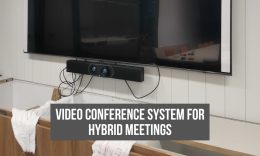
But here’s the good news. You can ditch your webcam and let your video bar talk with conferencing software that everyone uses.
The question is, what conference apps can work smoothly with your video bar?
Which conference apps can hold your meeting of up to 50 or more people?
Which conference can efficiently share your whiteboard with your team and transfer your audio and video signals fast as lightning?
All this is possible with a trusty video bar and compatible video conferencing software.
In this article, we’ll share how to choose a video conferencing app for your video bar.

What does being certified by a video conference app mean for a video bar?
Conference apps boast integration and collaboration features that certified video bars can only activate and fully utilize.
In our database, we find each video bar unit to have more than one certification or support from a dedicated video call software.
a. Compatibility
A certification from conference apps means your video conference bar and software are talking in the same language and working with the same technology.
Having the same technology enables your call to go through smoothly with minimal glitches and compatibility issues.

b. Optimized performance
When your video bar is technically inclined with the conference apps, communication becomes smoother. There is less possibility for video lags and choppy dialogues between lines.
c. Feature support
Certification ensures that your video bar can utilize a full range of features in a conferencing app, enhancing collaboration, integration, and productivity.
d. User-friendly experience
Depending on the conferencing app, users can enjoy intuitive interfaces like reserving slots for meetings or joining meetings seamlessly.
Or, speakers can easily control the video bar using the remote control or touchpad without changing devices.
When they talk in the same language, the conferencing platform can easily recognize the video bar without undergoing manual configuration.
e. Collaboration and partnership
Video bars, being the tool to activate conference app features, will improve collaboration and partnership.
From technical integration to feature enhancement to innovation, both parties will continuously work together to enhance their features and improve services.
How to choose a video conferencing app for your team?
If you constantly handle meetings, webinars, or remote conferences, you need a reliable video conference platform. Here’s how you can choose the right video conference platform.
1. Know the size of your team or audience.
A bigger team will need a platform that can hold more people. In general, the more participants you need to join the webinar, the more you have to upgrade your plan.
The good thing about video bars is more people can join from one piece of equipment.
Video bars cover more people at an average of 120° field of view.
2. Determine your monthly budget for a subscription.
Most conferencing apps are billed per user. Other plans charge bills per host. In most cases, the latter is cheaper than charging per user. And it’s more practical.
3. Check your meeting frequency.
Determine how often you are likely to hold a meeting. This measure will help organize your meeting schedules, choose the right subscription plan, and determine the features your team will need.
4. Check the features.
In the end, these features will help you conduct meetings seamlessly. Conferencing apps offer tools that help you share data, presentations, and discussions smoothly. Not every video meeting software has the same features.
Check for features such as:
- Smooth call-in
- File sharing (check the storage allowed)
- Screen sharing
- Whiteboard sharing
- Scheduler
- Attendee reporting tools
- Security
- Resolution
- Audio pick-up
- Screen recording

5. Consider ease of use.
A conference app with an intuitive interface can develop a high familiarity level among your team.
A quick setup and joining process ensures more team members can join the meeting seamlessly.
The software that allows attendees to join the meeting without setting up an account or downloading the application is more convenient.
Those controls like muting or unmuting microphones, enabling or disabling video, screen-sharing, or AI capabilities such as auto-focus or noise-canceling (present in video bars) improve participant engagement in the meeting.
6. Look for security and privacy protection.
One crucial risk of hosting online meetings is the breach of security and privacy.
If you share confidential information, you need conference apps with strict security and privacy protection.
7. Explore integration options.
You need a conferencing app that integrates with collaboration tools outside its platform for a more seamless operation.
For example, a conference app may integrate with scheduling tools, document apps, project management tools such as Asana or Trello, whiteboarding tools, or CRM systems.

Top certifying video conferencing apps for video soundbars
Still don’t have a video conference in mind? The good news is, video bars can have two to three reliable certifying online meeting softwares. Most of them are the following:
Zoom
In my opinion, this video conference platform is the best of them all. It is packed with features for small to business-sized online meetings.
The call receiver can see you within 17 milliseconds with a fully integrated video bar.
Many people around the world enjoy the free version.
But if you want access to its more promising features like bigger cloud storage, up to 1000 participants, meeting URLs, custom emails, and more. The only problem with Zoom is it needs stricter security.
Microsoft Teams
Microsoft Teams is a feature-packed video conference platform. I recommend this if your entire team uses Office 365.
Enjoy outstanding collaborative features from 1 TB cloud storage to webinar housing, meeting recordings, and more.
It can host online events of up to 2000 participants. It has stricter security measures. Moreover, you can integrate MS Teams with Skype Business. seamlessly.

Google Meet
If your team uses Google Suite, Google Meet should be your virtual conference platform.
Since most users today use Google accounts, you’ll probably have a hassle sending out invitations. Most users can access Google freely.
The platform lets you save up to 500 hours of video in 1080p with its 1TB cloud storage.
If you have a small team, you may not have to pay for a plan because the free plan can hold online meetings of up to 100 participants and integrate with Google Apps smoothly, but with limitations of course.
Skype Business
Skype is a great platform for small teams.
You can conduct uninterrupted calls for up to four hours and just continue another four for free.
It can take up to 50 participants in the free plan, while the Business Plan can host online meetings with up to 250 participants.
The exciting part is it integrates smoothly with MS Teams with whiteboard-sharing capabilities.
Which one to purchase first? A video bar or a conference app?
Think of your dream team. Think about your team’s requirements to work seamlessly. From there, plan for your long-term goal.
A reliable video conference app will work best with a compatible bar– one that will unlock its full potential. Now, check your budget.
Is your current app falling behind your needs? Do you think you need to upgrade?
Or, do you think you have the right app but not the suitable hardware for more streamlined collaborative online discussions?
Here’s my challenge for you. Check your resources. What are the tools you are currently using?
Starting up? Here’s how you can set up your meeting room.
Start weighing if you need to upgrade your current meeting platform. Get a video bar that can support most online meeting apps today.
Your team can benefit, when it comes to collaboration, with the right video conference software/hardware combo.
You only need reliable video conferencing equipment to go with your TV or smart projector, and a rolling TV stand.