We are independent, red buttons are affiliate links and approved purchases help support our guides at no extra cost to you. Learn more.

Last Updated on April 20, 2026 by Johann Holsinger
A soundbar with a webcam?
Conducting meetings frequently online doesn’t mean you have to settle with a webcam.
With fewer spaces used in offices, it’s time for businesses to invest in technologies that streamline conferences.
We used webcams initially for personal calls and a few recordings. But how can this equipment catch up with crucial details during conferences when they lag and catch noise from your surroundings?
I experienced this a lot before when my teammate continuously told me he could not hear me. I have to move closer to the camera.
And it’s embarrassing they can see parts of my nose and mouth from the camera.
This situation is not acceptable when you are meeting more people online. Glad that video conference bars exist.
These AV equipment truly rocks in the online boardroom. This equipment will change how you present to huddle rooms. And if you have no idea how to get one, we’ve made it easier for you.

Best Video Conference Bars
#1 Editors Choice
Jabra Panacast 50

- Impressive 13mp camera lens with 6x digital zoom feature
- Extra-wide 180° field of view
- Includes eight beamforming microphones
- Efficient, intelligent face detection
- Intelligent social distancing safety feature
- Smart live whiteboard streaming and sharing
- Pricey
- Video feed reconnecting issues
- Stand is not included.
#2 Best value
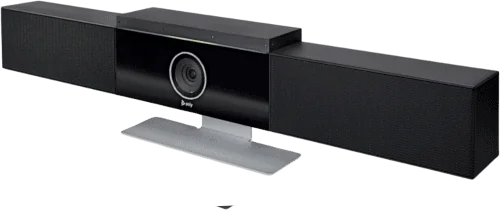
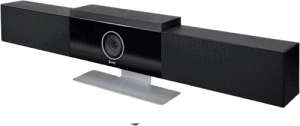
Poly Studio
- Works with most video conference software
- Can view up to 120° wide
- Sleek and stylish
- Plug-and-play setup
- With six beamforming-mic arrayIncludes Kensington security slot
- 4K quality camera resolution
- Impressive clear and vivid audio
- Needs system update before using
- Microphone may not pick up clearly in larger huddle rooms
#3 Smart video bar
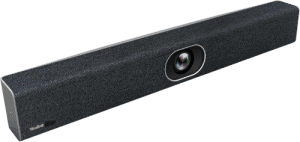
Yealink UVC40

- Wide view of up to 133°
- Produces crystal, clear picture quality
- Picks up voices and audio at 19 ft
- A wide array of connections available
- 20MP 1-inch CMOS lens
- Smooth with 4k @60 frames per second
- Multiple mounting options
- Includes privacy lens cover
- Noise-cancellation features
- May have a problem detecting faces at farther positions
- Manual instructions should be improved
#4 Longest audio pick up
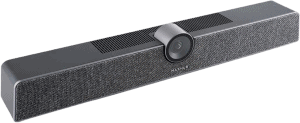
Maxhub UC S10

- Shows up to 120° field of view
- Facial detection capability with auto-framing
- Screen-sharing feature
- Longest pick-up range at 26 ft or 8 m
- Intelligent auto-focusing feature
- Microphones with noise-canceling
- Multiple ports for various connections available
- Setup needs more documentation
- Only one USB port available
#5 Bar for small huddle rooms
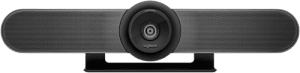
Logitech MeetUp

- Perfect for small huddle rooms
- Impressive audio reception even with a few mics
- Supports 4k resolution
- Compatible with most video conferencing software
- Handy remote control for panning, zooming, and tilting functions
- Mics have noise-isolating capabilities
- Shortest range and fewest mics available
- No USB 3 to support 4k
- No built-in controls
- Digital zoom produces pixelated images
#6 Bar for home conference
Yealink UVC34

- All-in-one video bar
- Wide, 120° angle view of participants
- Includes eight mics and high-fidelity speakers
- Secured meeting with privacy lens
- With built-in Wi-Fi
- Autofocus could be improved
- Sound recorded should be improved
#7 Video conference bar
Logitech Rally Bar

- May work as a standalone or connected bar
- AI noise isolation capability
- Can pick up audio at up to 23 ft
- Works with Logitech Tap controller
- Connect to two 4k screens
- Grate cabling management
- The standalone operation can be tricky.
- The automatic zoom feature needs improvement.
- Only 90° angle field of view
#8 Virtual smart video bar
Logitech Rally Bar Mini

- Perfect for a small group conference
- Comes with a universal mount to attach to the back of the TV
- Designed for permanent installation
- Use or call with a tap controller
- Picks up voice at 23 ft
- Camera and voice tracking needs improvement
#9 Home conference video soundbar
Ankerwork BR300

- Captures wide 120° field of view
- Crystal clear image
- Compatible with various video conferencing software
- No software installations required
- Clear sound
- AI tracking issues
- Not for larger rooms
#10 Most affordable
RayBit TB5

- Crystal clear image quality with a 1/2.8-inch CMOS lens
- Supports external mic
- Impressive sound from built-in HiFi speakers
- With a security lock port
- Efficient AI focus
- With a security lock port
- Simple and easy setup
- Noise-reduction feature needs improvement
#11 Virtual video bar
WyreStorm HALO-VX10-V2

- Sleek and elegant design
- Includes built-in speaker
- Advanced AI tracking capabilities
- No software installation required
- Multiple mounting options
- Includes security Kensington slot
- Built-in speakers may produce a tinny sound
Why do you need a video soundbar?
Whether working at home or in the office, providing a good streaming reception from your end is a must.
Many miscommunications happen during virtual or hybrid meetings because of poor conference equipment.
That’s just one of the reasons why you need a video bar instead of regular webcams, and there’s more.
1. Have an all-in-one conferencing device.
Except for your slides and grit, a quality video conference bar is all you need to pull off that much-awaited presentation.
You don’t have to deal with wire, external speakers, and mic clutter. A video soundbar already has a camera, built-in speaker, and microphone.
Some conferencing cameras even have built-in Wi-Fi.
2. No need to get out of the office
You can waste a lot of time traveling for a meeting.
If you have a huddle camera system at home or in the office, you can attend more meetings online and stay productive even without leaving home or the office.

3. Share screen virtually.
Some video conference bars have screen-sharing functionality. This feature allows you to share your presentation virtually with your teammates from the office or at their home desktops.
Most video software has screen-sharing capability. With this technology, your teammate from the other end will not miss the information from your slides.

4. More efficient collaboration.
A video conference bar enhances and streamlines communication as if you are actually in the meeting.
If you use a regular webcam, it does not have face and voice detection capabilities that will help the camera focus on the speaker.
If the mic and camera detect and respond to the speaker in seconds, the communication becomes smoother because you can converse continuously without distractions.
Most video bars in this list can catch audio up to 16 ft. The longest one can pick up audio from 26 ft. With these declarations, it will still be advisable to use external mics for more and further participants.
5. Covers more people in the team
Video collaboration system are so efficient for including more people in the meeting.
The equipment creates an immersive conference experience, and covers a wide-angle field of view, picks up voices from 14ft, works with various software, employs a pan-tilt-zoom functionality, and detects the speaker’s direction.
It’s hard to believe, but a video conference bar packs advanced and intelligent features that include the farthest participant of the meeting.
6. Quality video and high-fidelity audio for life-like meetings
Having quality video and high-fidelity audio are known for video bars. But the quality still depends on the brand– depending on the camera lenses and speakers they use.
The conferencing bars on our list are equipped with high-end CMOS image sensors, providing more detailed videos even with multiple zooms.
Meanwhile, video soundbars are equipped with an array of microphones placed strategically to capture audio from different directions, like you are speaking with your teammates face-to-face.
The beamforming technology boosts microphone sensitivity to the one speaking, producing clearer and crisp audio.
Some video bars include echo cancellation and noise reduction algorithms that improve the audio output better.

7. Conduct meetings regardless of room size.
In our database, the widest field of view is 180°, and the average is 120°.
That coverage is enough to show about 4-8 people in a meeting, depending on the camera distance and their seating positions.
8. Works with most video conferencing software.
Our recommended video conference bars on the list can work on different conference software. Zoo, MS Teams, Google Meet, and Skype Business. Some required third-party installation.
Some are already installed and only need login credentials to initiate or join meetings. The great thing about this is that you can invite partners, affiliates, or clients for a meeting and adapt to the software they use.
9. Save the entire meeting for documentation and reference.
Unlike in-person meetings, you cannot replay the entire meeting. Instead, you only have to take note of the minutes of the meeting.
The intelligent bar can preserve the important details, discussions, and agreements from a meeting through cloud platforms or local drives.
This feature allows authorized participants to retrieve and access specific sessions for reference, documentation, and training.
How do you choose a conference bar?
Spending on a conference bar is a huge investment, so choose it carefully.
1. Consider your room size and layout.
Conference rooms have a different layout. You need to consider your seating arrangement and the size of the room.
There will be different coverages for U-shape conference tables, boardroom style, or classroom arrangement. Your room size will affect the microphone performance and the area covered by the camera.
For this reason, you need to optimize your room setup for hybrid meetings.
If you have a considerably large conference room, you will need a video conferencing bar with a wider field of view and a longer audio pick-up range.
2. Find out the field of view.
The field of view is significant for choosing a collaboration bar because it helps you identify how much space it can cover from the placement.
If you want your entire team to be visible on the screen, you will need a video bar with a wider field of view.

3. Check the number of mics available.
The number of mics directly affects the ability of the bar to capture voices from different directions.
When meeting with a group of people, you want their voices to be heard when they are speaking, even if they are from the farthest seat.
4. What’s the audio pick-up range?
Aside from the number of mics, you must know how far they can capture voices. In our database, the farthest pickup range is 26 ft or about 8 meters.
From there, you can take note of the number of mics, room size, and room layout and see which bar in your choices can pick up voices from the farthest seat.
A seamless discussion during a conference is crucial because one participant can continue speaking but may not be heard from the other line.
Good thing the mics use sensors to detect voices and process them to eliminate or reduce the noise so the listeners from the other end can hear vivid sounds.

5. See the ports available.
Ports are crucial in equipping your meeting with the needed technology and extra devices. One of the non-negotiable ports that video bars must have is the USB-C.
Today, you can connect many devices with a USB C port. And HDMI, of course, helps process videos and audio in one cable. So make sure your device has both.
Another add-on we want is a security lock port that prevents theft and unauthorized device removal.
Identify the devices you will use as output and input so you can take note of the appropriate ports you need during meetings and conferences.
6. How about the universal compatibility?
Universal software compatibility ensures a conferencing bar will integrate seamlessly with various video conferencing platforms. It helps avoid delays when you can set up in a few minutes, and the platform connects to the internet and devices smoothly.
You want to ensure that your video bar supports commonly used platforms such as MS Teams, Skype, Google Meet, or Zoom.
Also, you want your video bar to be ready for technologies (like whiteboard sharing) that help streamline your conferences in real time.
7. Is it future-proof?
You need a bar that can keep up with future technology. First, it must support regular firmware updates.
Also, find one that conforms to open standards and compatibility. In the end, you may have to deal with different platforms, operating systems, and devices.
Get a collaboration bar that can connect wired and wirelessly– one that can support 4k resolution and advanced audio formats.

Our recommended video conferencing systems
Top-performing conference bar
Jabra Panacast 50
Our most intelligent video conference bar, the Jabra Panacast 50, employs three camera lenses, enabling a wide 180° angle field of view.
With this angle, you can use it on a round table, place the bar on the table itself, and cover more people, even from the opposing sides.
These cameras are so discreet you can mistake it for a soundbar.
The 3-pc 13MP cameras produce high-definition images in 4k resolution, allowing remote participants to view their team in sharp, clear details.
The 8-pc mic with beamforming technology can pick up speaker voices up to 16.4 ft. Built specifically for business settings, the Jabra Panacast has exciting screen-sharing features that allow participants to share their whiteboards in real-time.
The intelligent video bar also has a head counting and spacing feature that provides push notification if you have breached social distancing settings.
Truly, the Jabra Panacast 50 streamlines hybrid conferences with all the audio-visual equipment you need in one bar.
Pros
- More quality and detailed videos with a 13MP camera lens
- Accurate coverage with 180° field of view
- 8 smart beamforming mics
- Intelligent zoom technology
- Real-time whiteboard sharing functionality
- Compatible with most video conferencing platforms
Cons
- Have to buy the remote control separately
- Expensive

Best value video soundbar
Poly Studio
If you find Jabra Panacast 50 pricey, you can use the Polycom Studio USB video conferencing bar instead.
Poly has been a trusted company for making video cameras. And the Studio provides great value for businesses in streamlining hybrid conference setups at lower costs.
Although I can say, it is not that affordable, it is still considerably priced lower than our top performer.
Poly Studio is a 4k video conferencing solution that can cover a 120° FOV, allowing up to 5x zoom.
The smart video bar has auto framing, tracking, and noise reduction features essential to conducting seamless conference sessions in a hybrid setup.
With these features, no significant details are missed.
We had this several times in our meetings, and it continuously followed my colleague speaking. There might be a delay of two seconds, but it is not noticeable.
Pros
- Compatible with most video conferencing software
- Intelligent tracking, focus, and voice capturing
- CMOS lens produces sharp, crisp video quality
- 6-peace beamforming microphone array
- With Kensington security lock
Cons
- The voices can be softer on the other end
- No setup instructions included

The most affordable video bar
RayBit TB5
RayBit TB5 is a 4k video soundbar that can cover up to 120° view area. And for under 500 bucks, Raybit TB5 can catch up with the quality produced by high-end conferencing bars at a considerably low price.
With a 4-microphone array, this video bar can track speaker voices, reduce noises, and deliver crystal clear voices at the other end of the call.
The Zoom-certified conferencing bar uses a 1/2.8” CMOS optical sensor capturing and transmitting 4k ultra high definition video images that you can zoom in up to 6x.
Pros
- Plug-n-play setup
- Great voice pick-up ability, even with only a 4-mic array
- Decent AI tracking
Cons
- The noise cancellation feature could be better

What are the differences between video bars and regular webcams?
Video bars and conference webcams are different equipment.
Given that webcams are usually more affordable, it is all because video bars pack a more comprehensive system in one bar.
- A webcam is a small camera, sometimes with a built-in mic, designed to capture videos, stream live video calls, or video conferencing.
- A video bar is a comprehensive audio-video equipment designed for business meetings and seamless integrations with various technologies, thus having a built-in microphone, camera, and speakers in one bar.
- You can conveniently install or remove a webcam on a monitor or laptop
- A conference bar requires a more fixed installation on a mobile TV stand or a wall mount.
- Video bars use image and mic sensors to detect the people speaking and enable intelligent features like auto-framing and noise cancellation.
- Webcams do not have smart detection features.
- Video collaboration bars are tailored to conduct business meetings and share screens seamlessly.
- A webcam is more portable.
- A video bar is especially suitable for medium-sized or larger rooms with significant numbers of participants.

Who should own a video bar?
Video bars are tailored for remote collaboration. Therefore, it is perfect for
- Business organizations and teams, especially those who use a hybrid working arrangement
- Corporate offices with dedicated rooms to conduct conferences and meetings, like a boardroom, conference rooms, and auditoriums.
- Members of the remote teams or telecommuters
- Educational institutions conducting hybrid class arrangements
- Healthcare facilities conducting online consultations and virtual conferences

How I compared the features
 |  |  |  |  |  |  | 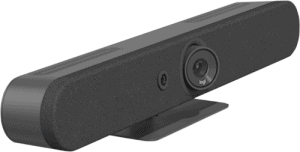 | 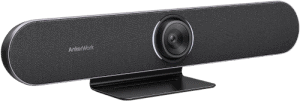 | 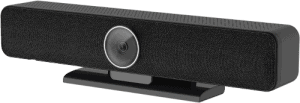 |  | |
| Verdict: | |||||||||||
| Field of view: | 180° | 120° | 133° | 120° | 120° | 120° | 90° | 120° | 120° | 120° | 120° |
| Audio pick up range: | 16.4 ft | 15 ft | 19 ft | 26 ft | 13 ft | 14 ft | 23 ft | 23 ft | 19.6 ft | 16 ft | 16.4 ft |
| Optical sensor: | CMOS (unspecified) | CMOS (unspecified) | 1-inch CMOS | 1/2.3-inch CMOS | CMOS (unspecified) | 1/2.5” CMOS, | CMOS (unspecified) | CMOS (unspecified) | Sony Sensor | 1/2.8” CMOS | CMOS (unspecified) |
| Microphones: | 8 pcs | 6 pcs | 8 pcs | 6 pcs | 3 pcs | 8 pcs | 6 pcs | 6 pcs | 4 pcs | 4 pcs | 2 pcs |
| Control: | Remote, app | Remote | Remote | Remote | Remote, app | Remote | Tap, remote | Tap, remote | Remote | Remote | Tap, app |
Our most recommended video bar
After extensive research and tests, we found Jabra Panacast 50 our top-performing video bar for business conferences and virtual meetings.
It has the most intelligent features necessary for conducting meetings with presentations and participants in mind.
It has the widest coverage, it can even include the ones beside from left and right.
Sharing up to three whiteboard screens, Panacast 50 streamlines conferences, where all the participants sit next to each other and converse face-to-face.
Jabra Panacast 50
- Uses three cameras for wide coverage
- Has eight built-in beamforming mics to pick up audio
- Intelligent screen and whiteboard sharing feature
- Sleek, minimalist design
- Plug-and-play setup
- Outstanding image quality
- Smart framing and tracking features
#1 Smartest video bar for conference